spring配置双数据源
Spring 双数据源配置与动态切换全指南
在企业级开发中,双数据源(或多数据源)是常见需求,例如 “主业务数据存库 A,特殊业务数据存库 B”。Spring 提供了 AbstractRoutingDataSource 抽象类实现数据源动态路由,配合 AOP 可实现 “注解式切换数据源”。从 “数据源配置→动态路由→AOP 切换→事务注意事项” 四个维度,详解双数据源的实现原理与最佳实践。
双数据源核心原理
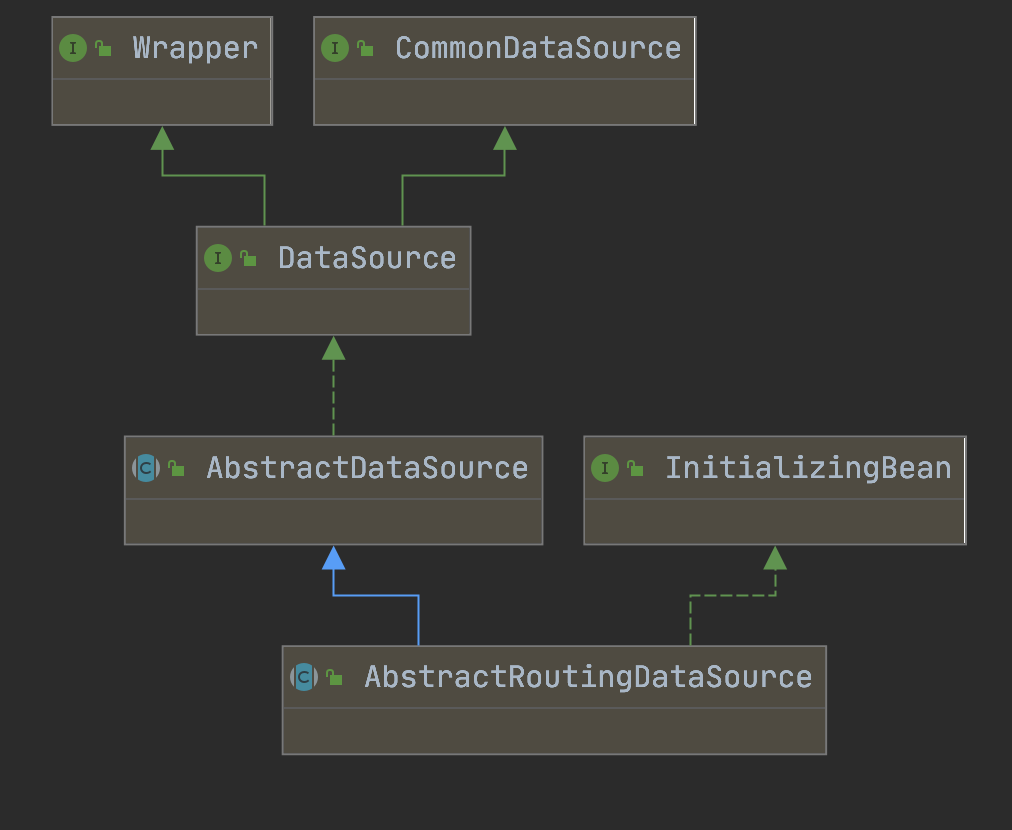
Spring 动态数据源的核心是 AbstractRoutingDataSource(抽象路由数据源),其工作流程如下:
- 维护数据源映射:内部通过
targetDataSources存储 “数据源 Key → 数据源实例” 的映射,通过defaultTargetDataSource指定默认数据源; - 动态路由:当执行数据库操作时,调用
determineCurrentLookupKey()方法获取当前数据源 Key; - 获取数据源:根据 Key 从
targetDataSources中匹配对应的数据源,若无匹配则使用默认数据源。
简单来说,AbstractRoutingDataSource 相当于一个 “数据源路由器”,通过 Key 决定当前使用哪个数据源。
双数据源配置步骤(XML 方式)
以 Druid 连接池为例,完整配置包括 “基础数据源配置→动态数据源配置→连接池与事务配置”。
1. 步骤 1:引入依赖(Maven)
需引入 Druid 连接池、Spring JDBC、事务、AOP 相关依赖:
<!-- Druid 连接池 -->
<dependency>
    <groupId>com.alibaba</groupId>
    <artifactId>druid</artifactId>
    <version>1.2.16</version>
</dependency>

<!-- Spring JDBC(数据源管理) -->
<dependency>
    <groupId>org.springframework</groupId>
    <artifactId>spring-jdbc</artifactId>
    <version>4.3.29.RELEASE</version>
</dependency>

<!-- Spring 事务 -->
<dependency>
    <groupId>org.springframework</groupId>
    <artifactId>spring-tx</artifactId>
    <version>4.3.29.RELEASE</version>
</dependency>

<!-- Spring AOP(切面切换数据源) -->
<dependency>
    <groupId>org.springframework</groupId>
    <artifactId>spring-aop</artifactId>
    <version>4.3.29.RELEASE</version>
</dependency>
<dependency>
    <groupId>org.aspectj</groupId>
    <artifactId>aspectjweaver</artifactId>
    <version>1.9.7</version>
</dependency>
2. 步骤 2:配置基础数据源(Druid)
配置两个独立的 Druid 数据源(分别对应 “主库 video” 和 “特殊库 ad”),并通过外部属性文件注入连接信息(避免硬编码)。
(1)外部属性文件(db.properties)
# 主数据源(video 库)
video.url=jdbc:mysql://localhost:3306/video?useUnicode=true&characterEncoding=utf-8&serverTimezone=UTC
video.username=root
video.password=123456

# 特殊数据源(ad 库)
ad.url=jdbc:mysql://localhost:3306/ad?useUnicode=true&characterEncoding=utf-8&serverTimezone=UTC
ad.username=root
ad.password=123456
(2)XML 配置数据源
<beans xmlns="http://www.springframework.org/schema/beans"
xmlns:xsi="http://www.w3.org/2001/XMLSchema-instance"
xmlns:context="http://www.springframework.org/schema/context"
xmlns:aop="http://www.springframework.org/schema/aop"
xmlns:tx="http://www.springframework.org/schema/tx"
xsi:schemaLocation="
http://www.springframework.org/schema/beans
http://www.springframework.org/schema/beans/spring-beans.xsd
http://www.springframework.org/schema/context
http://www.springframework.org/schema/context/spring-context.xsd
http://www.springframework.org/schema/aop
http://www.springframework.org/schema/aop/spring-aop.xsd
http://www.springframework.org/schema/tx
http://www.springframework.org/schema/tx/spring-tx.xsd">
<!-- 1. 引入外部属性文件 -->
<context:property-placeholder location="classpath:db.properties"/>
<!-- 2. 配置主数据源(video 库) -->
<bean id="videoDataSource" class="com.alibaba.druid.pool.DruidDataSource"
init-method="init" destroy-method="close">
<!-- 数据库连接信息 -->
<property name="url" value="${video.url}"/>
<property name="username" value="${video.username}"/>
<property name="password" value="${video.password}"/>
<!-- Druid 连接池参数优化 -->
<property name="initialSize" value="5"/> <!-- 初始化连接数 -->
<property name="maxActive" value="20"/> <!-- 最大活跃连接数 -->
<property name="minIdle" value="5"/> <!-- 最小空闲连接数 -->
<property name="maxWait" value="3000"/> <!-- 获取连接超时时间(毫秒) -->
<property name="validationQuery" value="SELECT 1"/> <!-- 连接有效性检测 SQL -->
<property name="testWhileIdle" value="true"/> <!-- 空闲时检测连接有效性 -->
<property name="timeBetweenEvictionRunsMillis" value="60000"/> <!-- 检测间隔(毫秒) -->
<property name="minEvictableIdleTimeMillis" value="300000"/> <!-- 连接最小生存时间(毫秒) -->
</bean>
<!-- 3. 配置特殊数据源(ad 库) -->
<bean id="adDataSource" class="com.alibaba.druid.pool.DruidDataSource"
init-method="init" destroy-method="close">
<property name="url" value="${ad.url}"/>
<property name="username" value="${ad.username}"/>
<property name="password" value="${ad.password}"/>
<!-- 连接池参数与主数据源一致,可复用 -->
<property name="initialSize" value="5"/>
<property name="maxActive" value="20"/>
<property name="minIdle" value="5"/>
<property name="maxWait" value="3000"/>
<property name="validationQuery" value="SELECT 1"/>
<property name="testWhileIdle" value="true"/>
<property name="timeBetweenEvictionRunsMillis" value="60000"/>
<property name="minEvictableIdleTimeMillis" value="300000"/>
</bean>
<!-- 4. 配置动态数据源(核心:继承 AbstractRoutingDataSource) -->
<bean id="dynamicDataSource" class="com.zhanghe.webconfig.datasource.DynamicDataSource">
<!-- 目标数据源映射:Key → 数据源实例 -->
<property name="targetDataSources">
<map key-type="java.lang.String">
<entry key="video" value-ref="videoDataSource"/> <!-- Key=video 对应主数据源 -->
<entry key="ad" value-ref="adDataSource"/> <!-- Key=ad 对应特殊数据源 -->
</map>
</property>
<!-- 默认数据源:当 Key 不存在时使用 -->
<property name="defaultTargetDataSource" ref="videoDataSource"/>
</bean>
<!-- 5. 配置 JdbcTemplate(使用动态数据源) -->
<bean id="jdbcTemplate" class="org.springframework.jdbc.core.JdbcTemplate">
<property name="dataSource" ref="dynamicDataSource"/>
</bean>
<!-- 6. 配置事务管理器(使用动态数据源) -->
<bean id="transactionManager" class="org.springframework.jdbc.datasource.DataSourceTransactionManager">
<property name="dataSource" ref="dynamicDataSource"/>
</bean>
<!-- 7. 启用事务注解 -->
<tx:annotation-driven transaction-manager="transactionManager"/>
<!-- 8. 启用 AOP(用于数据源切换切面) -->
<aop:aspectj-autoproxy proxy-target-class="true"/>
</beans>3. 步骤 3:实现动态数据源(继承 AbstractRoutingDataSource)
自定义 DynamicDataSource 类,重写 determineCurrentLookupKey() 方法,通过 DataSourceHolder 获取当前线程的数据源 Key。
(1)数据源持有器(DataSourceHolder):线程安全存储 Key
使用 ThreadLocal 存储当前线程的数据源 Key,避免多线程干扰(每个线程独立持有 Key),并在使用后清除(防止内存泄漏):
import org.apache.commons.lang3.StringUtils;

public class DataSourceHolder {
    // ThreadLocal:存储当前线程的数据源 Key
    private static final ThreadLocal<String> CURRENT_DATA_SOURCE = new ThreadLocal<>();
    // 默认数据源 Key(与动态数据源配置一致)
    private static final String DEFAULT_DATA_SOURCE = "video";

    /**
     * 获取当前数据源 Key
     */
    public static String getCurrentDataSourceKey() {
        return CURRENT_DATA_SOURCE.get();
    }

    /**
     * 设置当前数据源 Key
     */
    public static void setCurrentDataSourceKey(String dataSourceKey) {
        if (StringUtils.isNotBlank(dataSourceKey)) {
            CURRENT_DATA_SOURCE.set(dataSourceKey);
        }
    }

    /**
     * 清除当前数据源 Key(必须调用,防止内存泄漏)
     */
    public static void clearCurrentDataSourceKey() {
        CURRENT_DATA_SOURCE.remove();
    }

    /**
     * 获取默认数据源 Key
     */
    public static String getDefaultDataSourceKey() {
        return DEFAULT_DATA_SOURCE;
    }
}
(2)动态数据源类(DynamicDataSource)
import org.slf4j.Logger;
import org.slf4j.LoggerFactory;
import org.springframework.jdbc.datasource.lookup.AbstractRoutingDataSource;
public class DynamicDataSource extends AbstractRoutingDataSource {
private static final Logger LOGGER = LoggerFactory.getLogger(DynamicDataSource.class);
/**
* 核心方法:返回当前数据源 Key,用于路由到对应的数据源
*/
protected Object determineCurrentLookupKey() {
// 1. 从 ThreadLocal 获取当前 Key
String currentKey = DataSourceHolder.getCurrentDataSourceKey();
// 2. 若 Key 为空,使用默认数据源 Key
if (org.apache.commons.lang3.StringUtils.isBlank(currentKey)) {
currentKey = DataSourceHolder.getDefaultDataSourceKey();
}
// 3. 日志打印(便于排查问题)
LOGGER.info("线程[{}]当前使用数据源 Key:{}", Thread.currentThread().getName(), currentKey);
return currentKey;
}
}动态切换数据源:基于注解 + AOP
通过自定义注解 @DataSource 标记方法使用的数据源,配合 AOP 切面在方法执行前设置 Key,执行后清除 Key,实现 “无侵入式切换”。
1. 步骤 1:定义数据源注解(@DataSource)
import java.lang.annotation.*;
/**
* 数据源切换注解:标记方法使用的数据源 Key
*/
// 仅作用于方法
// 运行时生效
public DataSource {
// 数据源 Key,默认使用主数据源(video)
String value() default "video";
}2. 步骤 2:实现 AOP 切面(数据源切换逻辑)
切面的核心是:
@Before:在方法执行前,从@DataSource注解中获取 Key,存入DataSourceHolder;@After:在方法执行后,清除DataSourceHolder中的 Key(防止内存泄漏);@Order(1):确保切面优先级高于事务切面(切换数据源必须在事务开启前执行,否则事务会绑定默认数据源)。
import org.aspectj.lang.JoinPoint;
import org.aspectj.lang.annotation.After;
import org.aspectj.lang.annotation.Aspect;
import org.aspectj.lang.annotation.Before;
import org.aspectj.lang.annotation.Pointcut;
import org.aspectj.lang.reflect.MethodSignature;
import org.slf4j.Logger;
import org.slf4j.LoggerFactory;
import org.springframework.core.annotation.Order;
import org.springframework.stereotype.Component;
import java.lang.reflect.Method;
// 标记为切面
// 注册为 Spring Bean
// 优先级:1(高于事务切面的默认优先级)
public class DataSourceAspect {
private static final Logger LOGGER = LoggerFactory.getLogger(DataSourceAspect.class);
/**
* 切入点:匹配所有标注 @DataSource 注解的方法
*/
public void dataSourcePointcut() {}
/**
* 前置通知:方法执行前设置数据源 Key
*/
public void beforeSwitchDataSource(JoinPoint joinPoint) {
// 1. 获取目标方法
MethodSignature signature = (MethodSignature) joinPoint.getSignature();
Method method = signature.getMethod();
// 2. 获取 @DataSource 注解
DataSource dataSourceAnnotation = method.getAnnotation(DataSource.class);
if (dataSourceAnnotation == null) {
// 若注解为空,使用默认 Key
DataSourceHolder.setCurrentDataSourceKey(DataSourceHolder.getDefaultDataSourceKey());
LOGGER.info("线程[{}]未指定数据源,使用默认数据源", Thread.currentThread().getName());
return;
}
// 3. 从注解中获取 Key 并设置
String dataSourceKey = dataSourceAnnotation.value();
DataSourceHolder.setCurrentDataSourceKey(dataSourceKey);
LOGGER.info("线程[{}]切换数据源:{}", Thread.currentThread().getName(), dataSourceKey);
}
/**
* 后置通知:方法执行后清除数据源 Key(防止内存泄漏)
*/
public void afterClearDataSource() {
DataSourceHolder.clearCurrentDataSourceKey();
LOGGER.info("线程[{}]清除数据源 Key", Thread.currentThread().getName());
}
}双数据源使用:事务传播行为注意事项
在使用 @Transactional 注解时,必须注意事务传播行为,否则数据源切换可能失效。核心原因是:
Spring 事务会在方法执行前绑定数据源,若使用默认传播行为 Propagation.REQUIRED(继承父事务),子方法会复用父事务的数据源,导致切换失效。
1. 正确的事务传播行为:Propagation.REQUIRES_NEW
使用 Propagation.REQUIRES_NEW 新建独立事务,确保数据源切换生效(新事务会重新绑定当前数据源 Key 对应的数据源):
import org.springframework.beans.factory.annotation.Autowired;
import org.springframework.jdbc.core.JdbcTemplate;
import org.springframework.stereotype.Service;
import org.springframework.transaction.annotation.Propagation;
import org.springframework.transaction.annotation.Transactional;
public class AdService {
private JdbcTemplate jdbcTemplate;
/**
* 操作 ad 库:使用 @DataSource 切换数据源,事务传播行为设为 REQUIRES_NEW
*/
// 切换到 ad 数据源
public void deleteExpireAdData() {
// 执行 ad 库的 SQL(JdbcTemplate 会自动使用 ad 数据源)
String sql = "DELETE FROM ad_info WHERE expire_time < NOW()";
jdbcTemplate.update(sql);
LOGGER.info("删除 ad 库过期数据成功");
}
}
public class VideoService {
private JdbcTemplate jdbcTemplate;
private AdService adService;
/**
* 操作 video 库(默认数据源),并调用 ad 库方法
*/
public void processVideoAndAd() {
// 1. 操作 video 库(默认数据源)
String videoSql = "UPDATE video_info SET status = 1 WHERE id = ?";
jdbcTemplate.update(videoSql, 1L);
// 2. 调用 ad 库方法(新建事务,数据源切换生效)
adService.deleteExpireAdData();
}
}2. 事务传播行为对比(为什么不能用 REQUIRED)
| 传播行为 | 作用 | 对数据源切换的影响 |
|---|---|---|
| REQUIRED(默认) | 继承父事务,无父事务则新建 | 子方法复用父事务的数据源,切换失效 |
| REQUIRES_NEW | 新建独立事务,暂停父事务 | 新事务绑定当前数据源 Key,切换生效 |
| SUPPORTS | 有父事务则加入,无则非事务 | 若父事务存在,复用父数据源;否则切换生效 |
| MANDATORY | 必须在父事务中执行,否则抛出异常 | 复用父事务数据源,切换失效 |
常见问题与避坑指南
1. 数据源切换失效?检查 AOP 优先级
若切换失效,首先确认 DataSourceAspect 的 @Order 优先级是否低于事务切面(事务切面默认优先级为 Ordered.LOWEST_PRECEDENCE,即最小优先级)。@Order(1) 可确保数据源切换在事务开启前执行。
2. 线程安全问题?必须清除 ThreadLocal
DataSourceHolder 的 clearCurrentDataSourceKey() 必须在 @After 中调用,否则 ThreadLocal 会持有线程引用,导致内存泄漏(尤其是线程池场景)。
3. 多数据源 Key 不一致?统一 Key 定义
建议用枚举统一管理数据源 Key,避免硬编码错误:
public enum DataSourceKey {
    VIDEO("video"), AD("ad");

    private final String key;

    DataSourceKey(String key) {
        this.key = key;
    }

    public String getKey() {
        return key;
    }
}

// 使用时:@DataSource(value = DataSourceKey.AD.getKey())
4. 连接池参数优化?避免性能问题
maxActive:根据并发量设置(如 20~50),避免过大导致数据库连接耗尽;testWhileIdle:开启空闲连接检测,避免使用失效连接;removeAbandoned:开启遗弃连接回收(removeAbandoned=true),避免连接泄漏。
扩展:Spring Boot 双数据源配置(简化版)
若使用 Spring Boot,可通过 application.yml 配置双数据源,配合 @Configuration 类简化配置:
# application.yml
spring:
  datasource:
    # 主数据源(video)
    video:
      driver-class-name: com.mysql.cj.jdbc.Driver
      url: jdbc:mysql://localhost:3306/video?useUnicode=true&characterEncoding=utf-8
      username: root
      password: 123456
    # 特殊数据源(ad)
    ad:
      driver-class-name: com.mysql.cj.jdbc.Driver
      url: jdbc:mysql://localhost:3306/ad?useUnicode=true&characterEncoding=utf-8
      username: root
      password: 123456
    # 动态数据源
    dynamic:
      primary: video # 默认数据源
      datasource:
        video:
          type: com.alibaba.druid.pool.DruidDataSource
        ad:
          type: com.alibaba.druid.pool.DruidDataSource
配置类:
public class DynamicDataSourceConfig {
// 配置 video 数据源
public DataSource videoDataSource() {
return DruidDataSourceBuilder.create().build();
}
// 配置 ad 数据源
public DataSource adDataSource() {
return DruidDataSourceBuilder.create().build();
}
// 配置动态数据源
// 优先注入
public DataSource dynamicDataSource( DataSource videoDataSource,
DataSource adDataSource) {
DynamicDataSource dynamicDataSource = new DynamicDataSource();
Map<Object, Object> targetDataSources = new HashMap<>();
targetDataSources.put("video", videoDataSource);
targetDataSources.put("ad", adDataSource);
dynamicDataSource.setTargetDataSources(targetDataSources);
dynamicDataSource.setDefaultTargetDataSource(videoDataSource);
return dynamicDataSource;
}
}总结
Spring 双数据源的核心是 AbstractRoutingDataSource + ThreadLocal + AOP:
AbstractRoutingDataSource实现数据源路由;ThreadLocal保证线程安全的 Key 存储;- 注解 + AOP 实现无侵入式切换;
- 事务传播行为
REQUIRES_NEW确保切换生效